Table of Contents
Sales Chat
Jamie is your newest sales team member – and instant sales intelligence agent. Chat about anything related to your content and sales, and get instant recommendations, insights, reports, and more.
This feature is part of the Sales Plan.
Overview
In each chat, tag your show(s) by typing "@" and entering/selecting the show name(s). This lets Jamie know which show(s) are being discussed, so every response is data-backed and tailored specifically to the show(s).
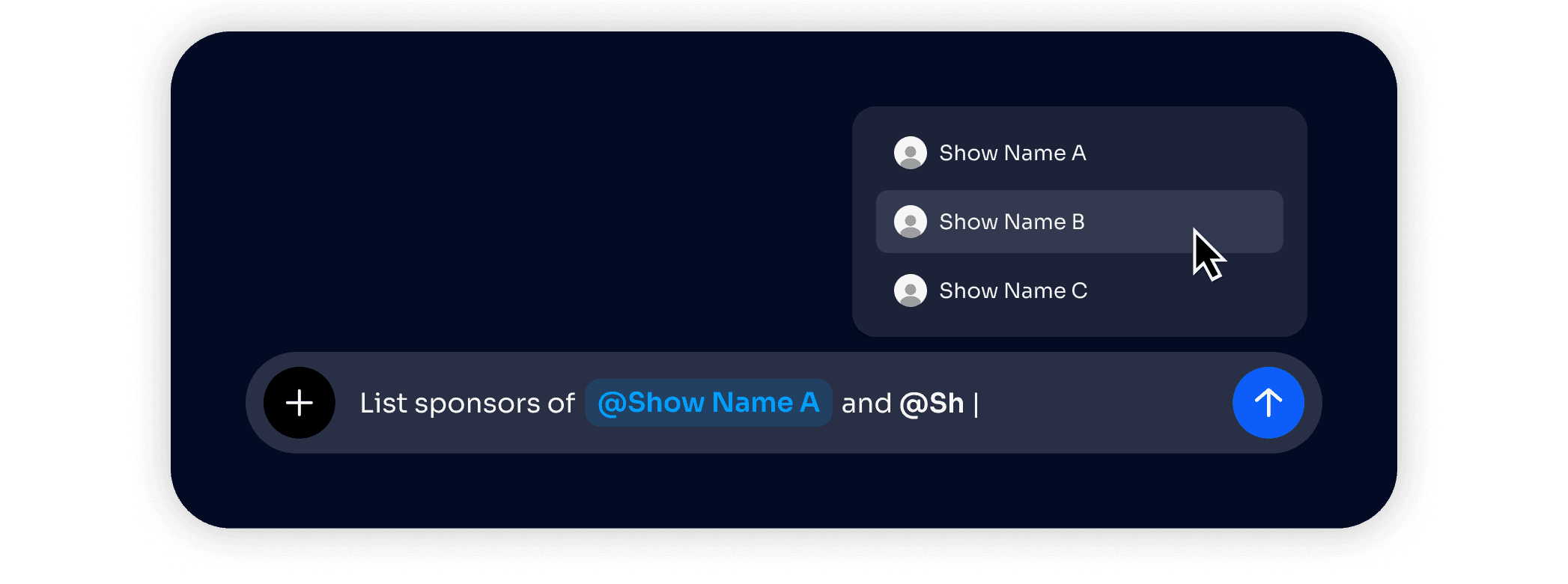
You can tag up to 15 shows in a single chat message or thread. Jamie remembers which shows you've tagged in each thread, so you can keep up conversation in each thread with the show context already embedded in.
Ask Anything
Ask Jamie anything related to your show, sales, competitors, performance, sponsors, and brand mentions. Have a conversation with Jamie, upload files for reference, or get materials directly in the chat.
Chat Shortcuts
Jamie can do a lot, and has some quick shortcuts so you can easily and quickly kickstart new chats. To view all of Jamie's shortcut chats, choose from the main chat UI, or click "Explore More" to view the full list of shortcuts, including:
Pull organic brand mentions
Find relevant brand moments
Explore host pain points
Find every time we talked about
{topic}for show@Which episode did we say: "
{quote}" for show@Find all mentions of
{person/brand/place}for show@What advice have I given about
{topic}for show@Find discussions about controversial topics for show
@What topics do I mention most often? for show
@Pull out any questions fans are asking repeatedly in the comments of my last full YouTube episode for show
@Which segments in my last full YouTube episode had the most engagement and why? for show
@Which segments in my last full YouTube episode had the least engagement and why? for show
@Search through the comments and find all mentions of
{brand}in my last full episode for show@What are the most engaging types of posts on my Instagram account? for show
@
For questions or support, please reach out to support@jamie-ai.com.
This feature is part of the Sales Plan.
Overview
In each chat, tag your show(s) by typing "@" and entering/selecting the show name(s). This lets Jamie know which show(s) are being discussed, so every response is data-backed and tailored specifically to the show(s).
You can tag up to 15 shows in a single chat message or thread. Jamie remembers which shows you've tagged in each thread, so you can keep up conversation in each thread with the show context already embedded in.
Ask Anything
Ask Jamie anything related to your show, sales, competitors, performance, sponsors, and brand mentions. Have a conversation with Jamie, upload files for reference, or get materials directly in the chat.
Chat Shortcuts
Jamie can do a lot, and has some quick shortcuts so you can easily and quickly kickstart new chats. To view all of Jamie's shortcut chats, choose from the main chat UI, or click "Explore More" to view the full list of shortcuts, including:
Pull organic brand mentions
Find relevant brand moments
Explore host pain points
Find every time we talked about
{topic}for show@Which episode did we say: "
{quote}" for show@Find all mentions of
{person/brand/place}for show@What advice have I given about
{topic}for show@Find discussions about controversial topics for show
@What topics do I mention most often? for show
@Pull out any questions fans are asking repeatedly in the comments of my last full YouTube episode for show
@Which segments in my last full YouTube episode had the most engagement and why? for show
@Which segments in my last full YouTube episode had the least engagement and why? for show
@Search through the comments and find all mentions of
{brand}in my last full episode for show@What are the most engaging types of posts on my Instagram account? for show
@
For questions or support, please reach out to support@jamie-ai.com.
This feature is part of the Sales Plan.
Overview
In each chat, tag your show(s) by typing "@" and entering/selecting the show name(s). This lets Jamie know which show(s) are being discussed, so every response is data-backed and tailored specifically to the show(s).
You can tag up to 15 shows in a single chat message or thread. Jamie remembers which shows you've tagged in each thread, so you can keep up conversation in each thread with the show context already embedded in.
Ask Anything
Ask Jamie anything related to your show, sales, competitors, performance, sponsors, and brand mentions. Have a conversation with Jamie, upload files for reference, or get materials directly in the chat.
Chat Shortcuts
Jamie can do a lot, and has some quick shortcuts so you can easily and quickly kickstart new chats. To view all of Jamie's shortcut chats, choose from the main chat UI, or click "Explore More" to view the full list of shortcuts, including:
Pull organic brand mentions
Find relevant brand moments
Explore host pain points
Find every time we talked about
{topic}for show@Which episode did we say: "
{quote}" for show@Find all mentions of
{person/brand/place}for show@What advice have I given about
{topic}for show@Find discussions about controversial topics for show
@What topics do I mention most often? for show
@Pull out any questions fans are asking repeatedly in the comments of my last full YouTube episode for show
@Which segments in my last full YouTube episode had the most engagement and why? for show
@Which segments in my last full YouTube episode had the least engagement and why? for show
@Search through the comments and find all mentions of
{brand}in my last full episode for show@What are the most engaging types of posts on my Instagram account? for show
@
For questions or support, please reach out to support@jamie-ai.com.